

Last updated: 2026-10-05
“The passwords were hashed” is an incomplete answer after a data breach. The protection depends on the algorithm, its configuration, the passwords themselves, and what the attacker obtained.
Using MD5 directly for password storage allows attackers to test guesses at low cost. For businesses relying on a platform provider, the practical question is whether the provider can demonstrate how credentials are protected and how compromised accounts would be secured.
The public notice dated 30 September 2026 concerns Bambi Deri Mamülleri A.Ş. and reports:
That estimate is not a confirmed count of cracked passwords. The MD5 statement applies to this disclosure; it does not establish the algorithm used across other September breaches.
The notice does not identify the processor or specify salting, direct versus layered MD5 use, password policy, administrator storage, confirmed hash exfiltration, reset instructions, or affected session/authentication tokens. It describes an ongoing investigation, not final findings or a penalty decision.
As of 5 October 2026, our review of public sources did not locate a controller follow-up or final decision resolving those gaps. This does not establish whether customers received private communications.
A password-storage system keeps a value it can use to verify a submitted password, rather than keeping the password itself. At login, the system applies the stored algorithm and parameters to the submitted value and checks the result.
Hashing has no decryption key that restores the original password. But an attacker can try likely passwords, calculate their outputs and look for a match. Human choices are often more predictable than randomly generated secrets.
This is why “one-way” does not mean “unguessable.”
General-purpose cryptographic hashes are designed to process data efficiently. Password storage needs a scheme that makes repeated guesses costly. Replacing direct MD5 with a single SHA-256 calculation does not solve that design problem.
MD5 also has a separate, established weakness: broken collision resistance. A collision means finding two different inputs with the same digest. That is different from recovering a particular user’s password. Ordinary password guessing does not require an attacker to exploit MD5 collisions; it requires testing plausible candidates against the stored value.
For this reason, saying “MD5 collisions let attackers decrypt every password” would misdescribe both the attack and the evidence.
A salt is a unique random value used when deriving a password hash. It can be stored alongside the result; secrecy is not its purpose.
Without salts, identical passwords produce identical hashes under the same scheme, and attackers can reuse precomputed results. Different salts prevent that direct reuse and comparison across accounts. They do not make a weak password strong or turn direct MD5 into an appropriately expensive password-storage function.
For the Bambi incident, whether salts were used remains undisclosed. Neither “MD5 means unsalted” nor “perhaps it was salted, so it was safe” is a supported conclusion.
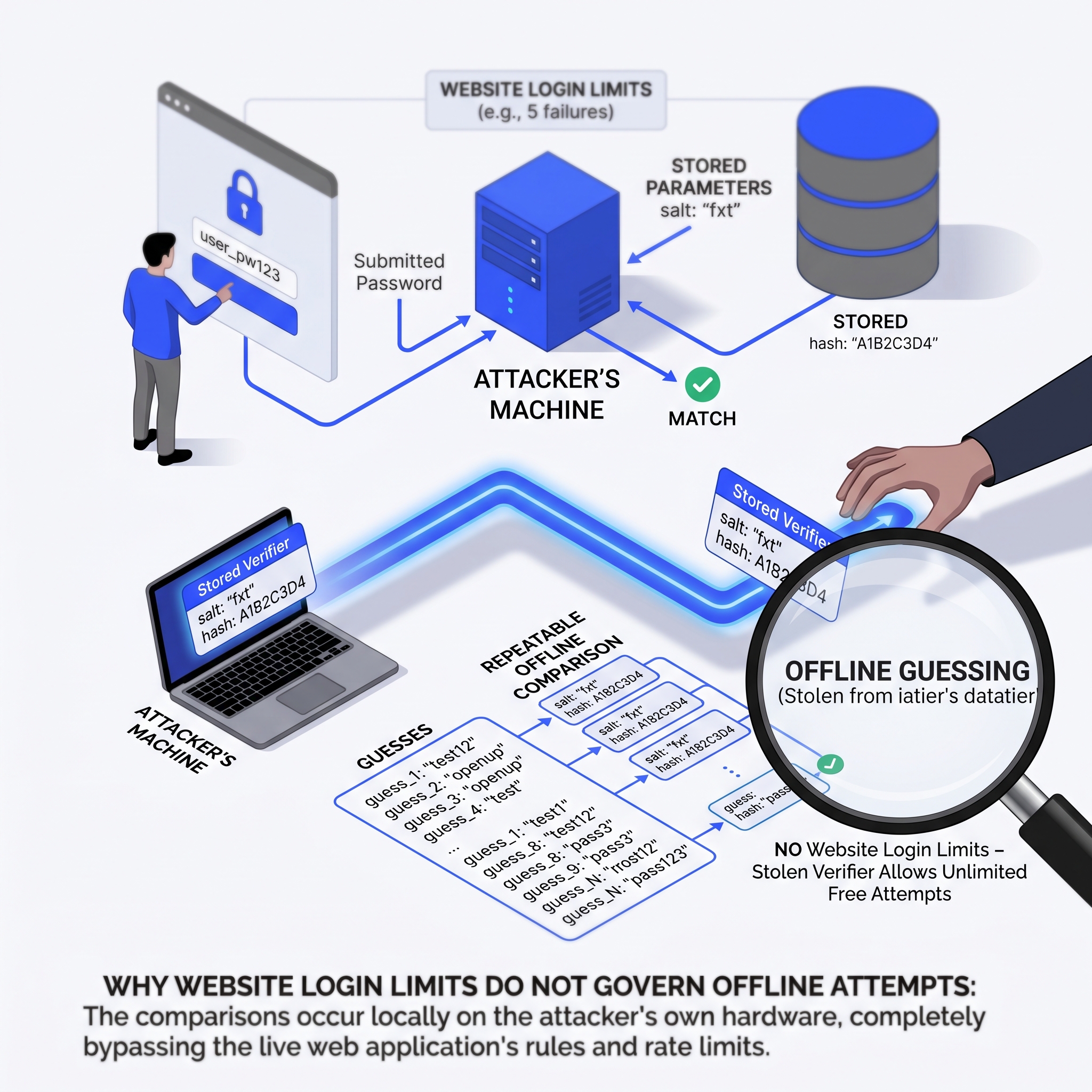
Once an attacker has usable password verifiers and the necessary parameters, guessing can happen on the attacker’s own hardware. The website’s rate limits and account lockouts do not govern those offline calculations.
Not every password will be recovered. Outcomes depend on password predictability, the storage scheme, available computing resources and any additional secrets needed for verification. An algorithm name alone cannot establish a credible time to crack the entire dataset.
If a recovered password is reused elsewhere, an attacker can try the same email/password pair on other services. This is credential stuffing. It is distinct from the earlier offline guessing step.
MFA can reduce successful account takeover, although it does not prevent an attacker from guessing a stolen password hash. Customers should replace reused passwords on other accounts as well as on the affected service, using a different password for each. A password manager makes that more manageable.
A customer account and a platform administrator account can grant very different powers. Depending on the application, administrative access may permit exports, account changes or integration management.
Request separate evidence for customer authentication, merchant administrators, provider support access and service accounts. Identify which use local passwords and which rely on an identity provider. Require MFA for privileged access and review what those accounts can do.
Do not infer administrator exposure or matching storage algorithms from a disclosure about user login information.
For a new implementation, use a maintained password-hashing library with Argon2id as the preferred choice where supported. Established alternatives include scrypt; PBKDF2 may be appropriate where relevant requirements or platform constraints apply. Existing bcrypt deployments need a configuration and migration review.
Argon2id provides configurable memory and computational costs. Those settings matter: the purpose is to make guessing expensive while keeping legitimate verification operationally manageable. The algorithm name does not tell you whether its deployment achieves that balance.
Ask the engineering team to document the actual parameters and test concurrent login demand on the intended infrastructure. A setting tested for one login is not evidence that the service can withstand peak traffic.
Use a high-level verification API that manages the salt and records the algorithm and parameters with the verifier. Avoid custom concatenation, repeated hashing or undocumented combinations invented in application code.
During a planned upgrade, an application can verify a legitimate login using the old scheme and create a new verifier from the submitted password. Dormant accounts need a separate decision because they may never log in to trigger that upgrade.
Track accounts still using the old scheme, assign responsibility for the migration, and define when an account must reset before further access. An incident involving exposed weak verifiers may justify forced resets rather than waiting for normal login activity.
Updating the live database cannot strengthen an older copy already held by an attacker. A migration plan therefore needs a separate decision about whether the underlying passwords remain safe to use.
Routine calendar-based password changes and incident-driven resets serve different purposes. Current technical guidance supports forcing a change when there is evidence of compromise, rather than imposing periodic changes without that evidence.
We recommend requiring resets for affected accounts when the investigation establishes exposure of weak password verifiers. Do not wait for proof that every password has been recovered. Where exposure remains uncertain, document the available evidence, logging limitations, account privileges and consequences of delaying action.
This is a response recommendation, not a claim that Bambi or the regulator ordered resets.
Before reopening access, contain the compromise and ensure new passwords will be stored appropriately. Review the password policy too: permit long passwords and password managers, and screen new choices against common or compromised values. Complexity requirements alone do not repair weak storage.
Use unpredictable, expiring, single-use reset tokens. Protect the reset process against automated abuse and notify users after a successful change. Direct customers to the familiar website or application; never ask them to disclose their old password to support.
Changing a password does not necessarily end existing sessions. The result depends on the application’s implementation.
For affected accounts, assess active web sessions, persistent “remember me” access and mobile sessions. Invalidate relevant sessions on the server and require fresh authentication. Removing a browser cookie alone does not revoke a stolen copy of its session identifier.
Where OAuth is used, check refresh-token revocation separately. Revoking a refresh token prevents further access-token issuance through it; establish how already-issued access tokens will be rejected or when they expire. Do not assume that password change, web logout and token revocation are the same operation.
If takeover is suspected, inspect changes to recovery addresses, MFA methods and trusted devices. A newly changed password may not restore control if an attacker has established another route back in.
Test the recovery process with a test account: create sessions on two devices, perform the incident reset, and verify that the old sessions and relevant tokens no longer authorize access. Record any remaining validity window and the decision to accept or remove it.
Account recovery checklist
A password change does not automatically end every form of access. Check each affected access route separately and verify the result with a test account.
A successful password change alone is not evidence that sessions, tokens or attacker-added recovery methods have been revoked.
Record the test results, any remaining access window, and the person responsible for resolving gaps. This checklist describes recommended checks; it does not establish what happened in the Bambi incident.
Credential abuse can continue after the original access route is closed. Review successful and failed sign-ins, unusual devices, reset activity and changes to sensitive account settings. Correlate events rather than treating an unfamiliar IP address as proof of takeover.
Assign an owner to review alerts and customer reports, with a defined route for securing suspicious accounts. Track detected and blocked attempts as well as confirmed unauthorized activity. Low numbers of failed logins do not establish safety: a valid stolen password may succeed immediately.
Keep useful event identifiers and timestamps, but do not place passwords or usable session/access tokens in monitoring logs. Restrict access to the logs and set retention according to the investigation and applicable requirements.
Your own authentication records generally cannot show whether a reused customer password is being abused on another company’s service. Customer communication should explain that residual risk without claiming downstream compromise has occurred.
For a controller buying an e-commerce or SaaS service, “passwords are hashed” should begin a technical review. The following is a recommended evidence request, not a universal statutory document list.
Review sensitive evidence through an agreed secure channel. Record unanswered questions as gaps with an owner and follow-up date, rather than treating the absence of evidence as a positive answer.
A useful provider response identifies the deployed storage scheme, accounts still using older protection, and tested recovery actions. That gives a business a basis for decisions about remediation and incident response.
If your supplier’s answer stops at “hashed,” request that evidence now. Kooch’s KVKK & GDPR Gap Analysis can review agreed vendor and security evidence and turn identified gaps into a prioritized remediation plan with proposed owners and dependencies.
The technical sources below provide guidance and specifications, rather than algorithm-specific requirements under Turkish law.
Public follow-up checks also covered Bambi’s website, KVKK page and privacy/security page, alongside targeted searches for further official notices. Public-source checks cannot establish the contents of private customer notifications.