

Last updated: 2026-11-11
Yes, it can. If a controller or processor subject to Türkiye’s Personal Data Protection Law (KVKK) makes personal data available to another controller or processor abroad, even view-only support access can qualify as an international transfer. The CRM database can stay in Türkiye throughout the session. Start by identifying the legal entity receiving access, the data it can see and who makes that data available.
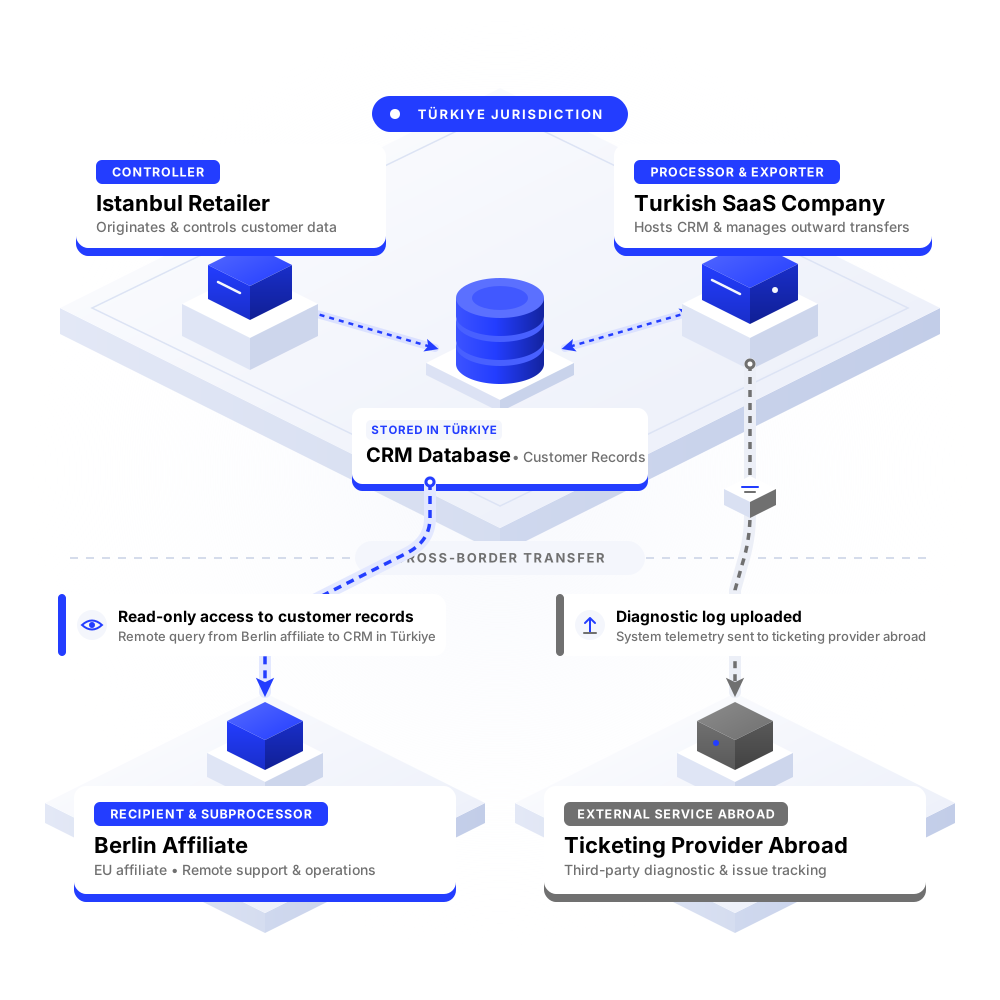
Imagine an Istanbul retailer uses a CRM operated by a Turkish SaaS company. The database and backups are hosted in Türkiye. When customer records stop syncing, the SaaS company’s Berlin affiliate takes the escalation. The Turkish SaaS company approves an hour of read-only production access for a Berlin engineer, who can see customer names and email addresses. The engineer diagnoses the issue without downloading a file.
In this setup, the retailer decides why customer data is used in the CRM. It is the controller for that processing. The Turkish SaaS company operates the CRM on the retailer’s instructions and is the processor. When it makes the records available to its separate Berlin affiliate for troubleshooting on the retailer’s behalf, the Turkish SaaS company is the exporter on that access path, and the affiliate is the recipient, acting as a subprocessor. On those facts, the remote viewing falls within the KVKK transfer framework.
The KVKK transfer guide uses three criteria. The exporter must be a controller or processor subject to KVKK for the processing in question. It must send personal data or otherwise make it accessible. The recipient must be another controller or processor located abroad, regardless of whether the recipient is itself subject to KVKK.
Approving a support account that can see production records can meet the access criterion. A screen share can also make personal data available. Check what the account or session exposes in practice, including search results, ticket previews and diagnostic screens.
The engineer’s employer matters. If the engineer in Berlin is an employee of the same Turkish legal entity and acts solely under its authority, that login alone may lack the separate recipient required under the guide’s criteria. Review any separate tools or providers involved and continue to assess the security of the overseas access. If the engineer works for a separate affiliate or an outsourced support company, assess that company as a possible recipient, even if it shares the vendor’s brand, email domain or sign-in system.
A direct support arrangement can change who exports the data. If the retailer itself gives its foreign support provider access to the CRM and that provider works on the retailer’s instructions, the relevant path could be controller to processor. Identify the parties and their roles for each use. If a provider uses ticket data for its own purposes, assess its role for that use separately.
Follow one real escalation from intake to resolution. A CRM’s hosting settings will tell you little about what happens in a help desk, a shared screen or an engineer’s downloads folder.
For a recurring support flow that qualifies as a transfer, identify the applicable processing condition under Article 5 or, for special-category data, Article 6. Then work through Article 9 in order.
Check sector rules before enabling access. For example, Türkiye’s banking information systems regulation requires banks to keep primary and secondary systems in Türkiye and separately regulates remote access to internal applications and systems. A bank or a vendor serving one should confirm how those rules apply to the specific system and support arrangement.
For the wider framework, see the KVKK compliance guide for businesses.
Start with synthetic test data or diagnostics stripped of personal data where possible. If an engineer needs production access, use an individually assigned account with multifactor authentication. Approve it for a specific ticket, restrict it to the fields and actions needed, and expire it automatically. Limit exports, clipboard access and session recording where feasible. Record who approved the session, when it ran and whether data was exported. Treat any personal data in those audit logs as another data flow to review.
For one CRM or help desk, pull together:
Start with one system. List who outside Türkiye can access personal data and on whose behalf. Then pick one recent ticket and see whether the access and the artifacts match that list. If you need help mapping those flows and prioritising fixes, explore Kooch’s KVKK & GDPR Gap Analysis.